The Map That Finally Left the Folder

I tap the route line across Italy, and up come the photos I took closest to that spot: Verona, the Palazzo della Ragione. One more tap, this time on the route to San Sebastián, and there’s La Concha beach in the pictures. All of it opens from a button in Telegram, in the same chat I drop reels into.
I already had almost everything behind that button. Over the summer an AI went through my 7,915 screenshots and 67,608 family photos and made some beautiful maps, which then just sat in a folder. The hard part was not the analysis but the last mile: the road from a finished map to a place where I run into it without trying.
TL;DR
- The maps from the summer now live in Telegram, in a mini app called Finds: 591 places, 50 trips, 6,345 of my photos, plus steps and tracks from my watch.
- A bot built the app in a day while I just talked to it. I didn’t write any code.
- Google Timeline is great at collecting data and dull at showing it, and it has nothing from before you switch it on.
- The lesson for companies: what matters is not clever analysis but where the data lives and how many taps it takes to get an answer.
Gathering dust
The first post got me a map of 192 places from screenshots, the second an atlas of trips from photos, the third a lesson that a geotag remembers the camera, not the person. All of it sits in a folder. And a map you have to go and open loses to a window that is open all day anyway. For me, that window is Telegram.
A button right in the chat
On Sunday, 11 October, I gave one of my bots the job of handling reels and named it Breakdown. The same day I asked it to build an app, and at 15:20 a Finds button showed up in the chat. By that night the map had the routes and my photos on it, and by Monday morning the trips from my father’s list. I didn’t write the code: I said what I wanted, looked at what came back, asked for fixes. A reel I drop into the chat lands on the map a few minutes later.
Five questions for the map
Every screen answers a question I ask myself.
What did I shoot there?
New Year in Italy: eleven days by bus, train and car, from Milan to Rome. I can dig the Verona day out of 70,000 pictures in my gallery, but it’s a long scroll. On the map, one tap on the route does it.
What was it like?
Switzerland, September 2020: six days based in Thun, with a new trip out each day - Oeschinen Lake, Bern, Lausanne, Montreux, Basel. The card has a satellite map of the route and the photos in order, and any of them opens full screen. In half a minute the six days come back together as one trip.
Where did I walk, and how far?
Inside a city the map knows more than I remember: 3,577 walk points from the geotags on photos and videos, 1,291 of them landmarks. My phone and watch added steps for every day and the tracks of my walks. Istanbul, 3 January 2025: a point at the German Fountain, 17:06, two photos, and under it a 9-kilometre track from my watch. I tap the line and the trip opens: nine days around the Sea of Marmara, 132,398 steps, 101 kilometres.
Have I been here before?
I once saved the Old Bridge in Heidelberg as a screenshot, like hundreds of other places. Now its card has found six of my own photos from there on its own. For the first time “want to go” and “been there” sit on one map, and you can see where they overlap.
Where next?
Plans are coloured by how soon they are: the closer the trip, the brighter the line. The longest plan is still a dream: from Kemijärvi in Finland to Lagos in Portugal, 23 trains, as far as EU rails go. “Harry Potter across Britain” runs up against the UK visa. A plan’s card shows the cities along the route right away, with photos from Wikipedia.
An AI agent recorded these clips from a script, and photos with people in them were taken out before recording.
Walks up close
Three cities, each day in its own colour. The solid line is the watch track, the dots are where I took pictures, the dashed line is me walking between them. If two shots are more than 900 metres or 40 minutes apart, I most likely rode that stretch, so there’s no dashed line there.
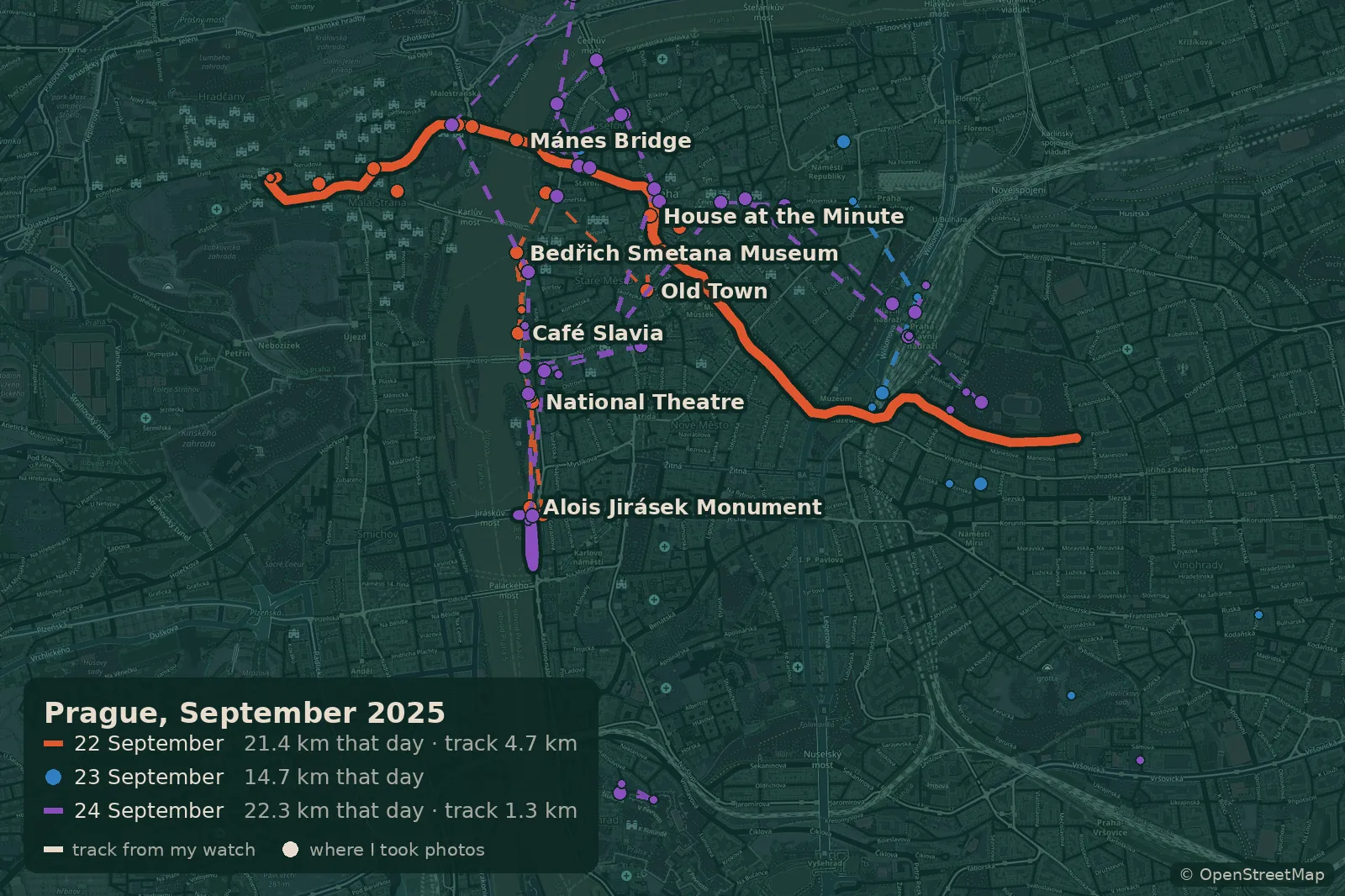 Prague, 22-24 September 2025. The 22 September track: 4.7 km through the Old Town and over the Mánes Bridge to Hradčany. 58 km over the three days.
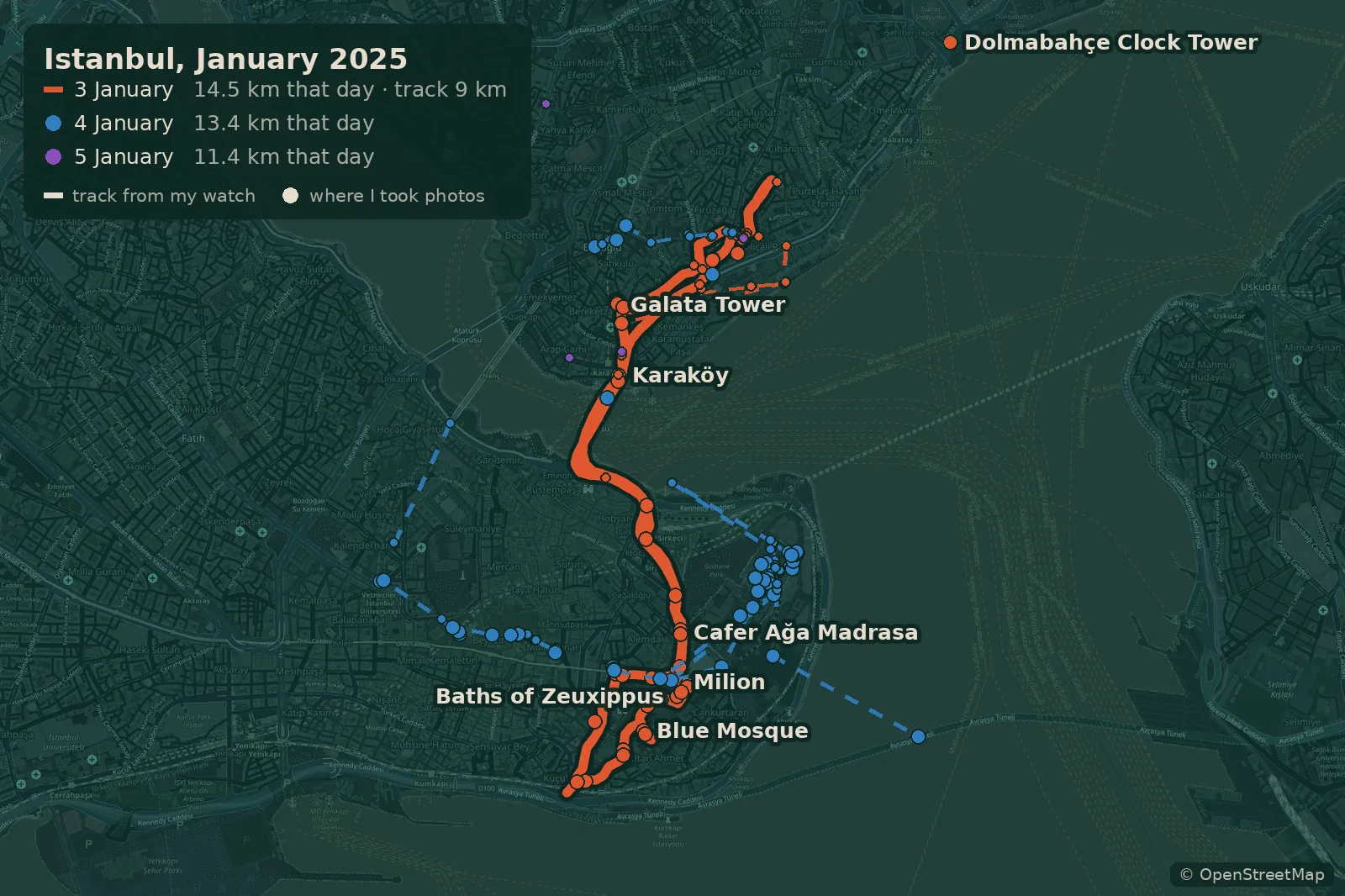 Istanbul, 3-5 January 2025. The 3 January track: 9 km from Beyoğlu to the Blue Mosque and back.
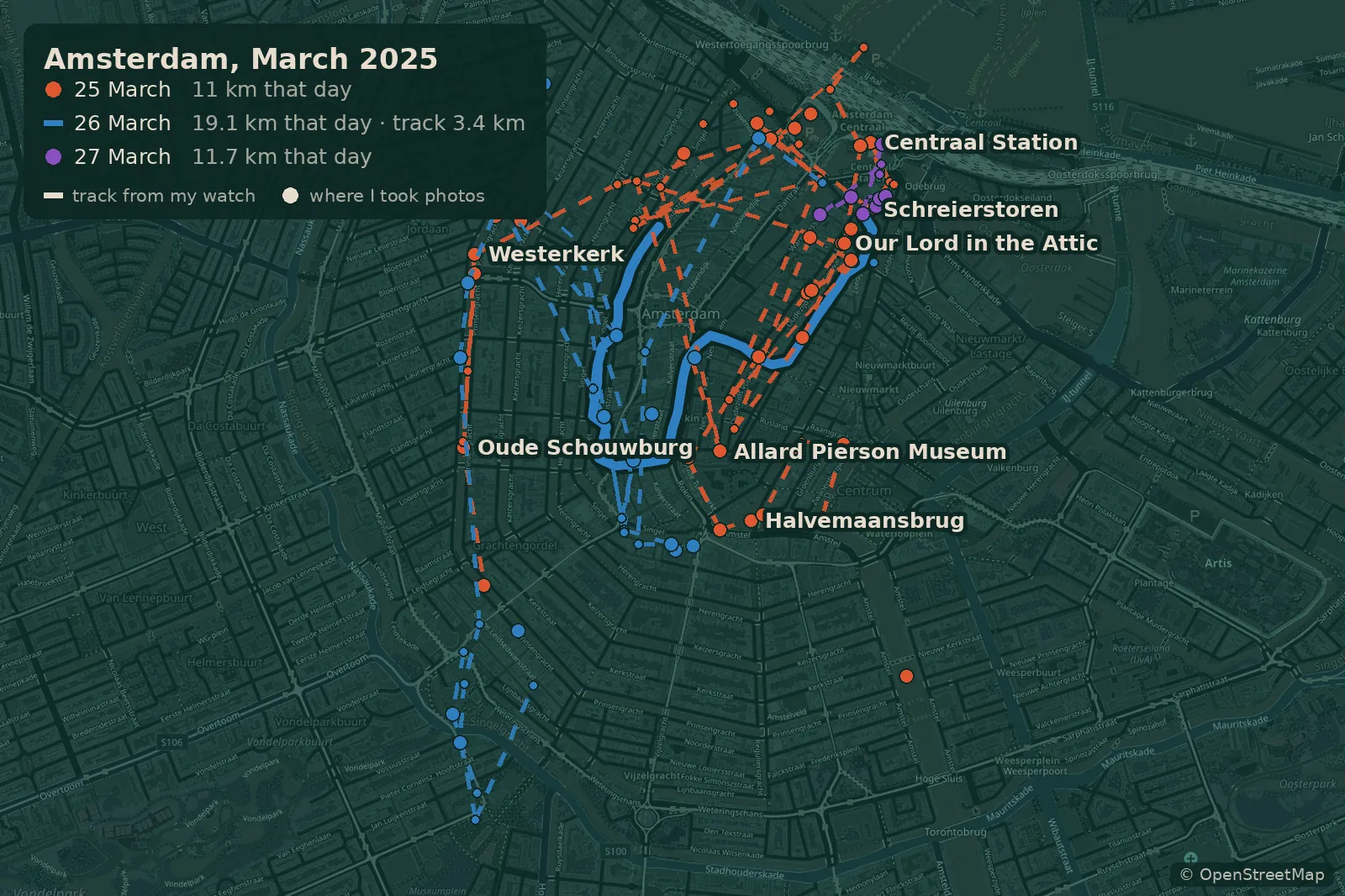 Amsterdam, 25-27 March 2025. The 26 March track: 3.4 km along the canals.
My phone and watch count steps all the time, and from April 2024 on I have them for 11 trips.
- Bulgaria, from Rila to the Sea 2024 113 km
- Around the Sea of Marmara 2024-25 101 km
- Amsterdam and Luxembourg 2025 55.7 km
- Paris 2025 49.6 km
- Bulgarian Coast 2025 182.8 km
- Prague and Olomouc 2025 91.8 km
- Italy for New Year 2025-26 130.2 km
- Colmar 2026 25.6 km
- Brussels 2026 41.5 km
- Romantic Road 2026 61.4 km
- The Baltics 2026 63.9 km
Record - 24 September 2025, Prague: 29,858 steps, 22.3 km, track: walk 1.3 km
Each segment is one day, its length is the kilometres walked that day, and the bright ones are days with a watch track. Tap a segment to see the details.
A second witness
In July the photos credited me with a safari in Madagascar, where I have never been. Now the map has a second witness with no GPS at all: the list of our trips abroad that my father sent over in 2022. The cross-check worked both ways.
The most useful part is where the witnesses disagree. A company usually has a second witness already, it just never gets called: for the CRM it’s the invoices, for orders it’s the warehouse.
What about Google Timeline?
| Google Timeline | Finds | |
|---|---|---|
| Where the data comes from | records it on its own, in the background, while switched on | collects it later from photos, videos, emails, lists and watch data |
| The past | only from the moment you switch it on | 50 trips since 2000 |
| What it looks like | a day-by-day feed, tabs for places, cities and countries | all the trips and my photos on one map |
| Plans and saved items | none | 591 places, 57 finds, 5 plans |
| Getting to it | Maps → profile → “Your Timeline” | a button in the chat I’m in all day anyway |
| Where the data lives | on the phone, encrypted backup if you want it | my own server, only I have access |
Timeline collects data better than anything else: it records every day on its own, no photos needed. But it’s dull to look at: Google has the data, it just doesn’t seem to have designers. On the bright side, you can export your timeline from Google Maps as a single file, and then Timeline becomes just the collector while I do the looking in Finds. Apple Photos and Polarsteps each have their own tricks, but neither keeps the past, plans and finds in one window.
The lesson for anyone doing analytics
It’s an uncomfortable lesson, and it applies to me too. A report in a folder and the same report in the chat where the team spends all day are two different products with the same content. I’d start any data project by asking which window people will see the answer in, and how many taps it takes to get there.
There are weak spots too. New photos don’t reach the map on their own yet, and places from old screenshots may have closed. And I don’t know if I’ll still be opening Finds three months from now. If I’m still going in once a week come January, then it came down to the last mile. If not, there will be a fifth post.
What’s next
My father’s list has no trips inside Russia. Most of the old trips don’t have a single photo of mine, so their cards use pictures from Wikipedia. The next step is my parents’ photo archive, about two terabytes: I’ll match it against the map by date and see how many childhood trips it brings back. Steps and tracks only go back to April 2024 for now. A full Apple Health export will add steps to the older trips as well.
Stack: Telegram Mini App · Leaflet · Python · Claude
Questions about this post, or built something similar? Write to me →
Get the AI Audit Kickoff Checklist
Twenty questions to ask about your own processes before you spend a cent on AI, as a 7-page PDF workbook in English or German. Drop your email and you get it right away, plus the occasional note when I write something worth your time. No spam, unsubscribe in one click.